



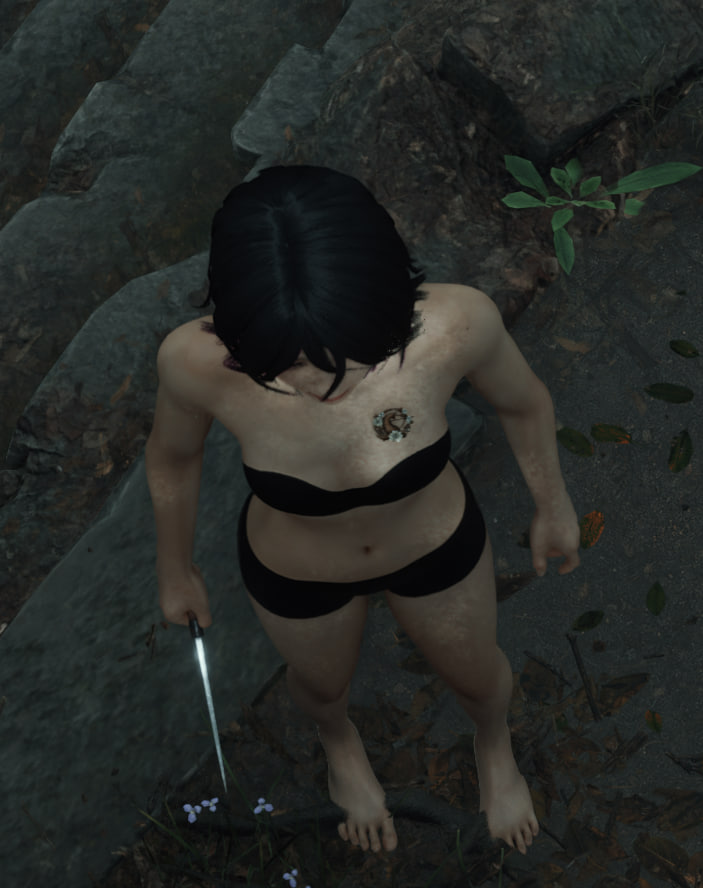
Удаляет черный "туман нижнего белья" (UnderWearFog) на модели персонажа в игре.
Должен работать с любыми другими модами, позволяя моддерам использовать материал кожи Хинако без цензуры.
Как моддер, вы можете включать этот мод в свои моды любым способом, каким пожелаете. Но, вероятно, проще всего указать этот мод и Simple Mod Loader в качестве зависимости.
Инструкция по установке:
- Требуется SIMPLE MOD LOADER
- Поместите содержимое zip-архива в папку SHf/Mods (создайте ее, если она не существует)



Всё работает, спасибо
It has no effect when placed in MODS. Is there a complete installation tutorial? Or the full path?
сюда ✅ E:\SteamLibrary\steamapps\common\SILENT HILL f\SHf\Mods
не сюда ❌ E:\SteamLibrary\steamapps\common\SILENT HILL f\SHf\Content\Paks\~mods
К тому же не все моды «смирились»: кто-то встраивает удаление в свою модификацию, кто-то подключает его модульно (как отдельный файл, который не работает с другими модами). А кто-то вообще делает всё настолько криво, что, например, при попытке удалить тень, она расползается по рукам. о_О
So the path would be ...SILENT HILL f\SHf\Mods\BlackFogRemover\Content
...\Resources
...\BlackFogRemover.uplugin
I've placed here and it doesn't work. I've also tried to put the Content, Resources fodlers and the uplugin file directly in the Mods folder above and it still doesn't work. Would the mod I'm suing be the problem then?
I tried everything but it didn't work. If possible, could you send me a video tutorial
Please, please, please.
You should have approximately this file content in the folders (path as in the screenshot) for everything to work.
I didn't download the game from Steam. I downloaded a crack.
How can we add the mod using SML? I've tried using the command "mod add BlackFogRemover" and received errors failed to load asset and failed to resolve asset
Это не работает
Replace the folders like this
чёрный???